
Your Feedback Data Belongs on Your Machine: Using Gemma 4 to Analyze Customer Feedback Privately
Every time you send customer feedback to a cloud AI API, you're shipping your most sensitive product intelligence off-site. Gemma 4 changes that. Here's how product teams can run powerful feedback analysis locally — no cloud, no per-token costs, no data exposure.
Alex Kumar
Product Strategy Lead
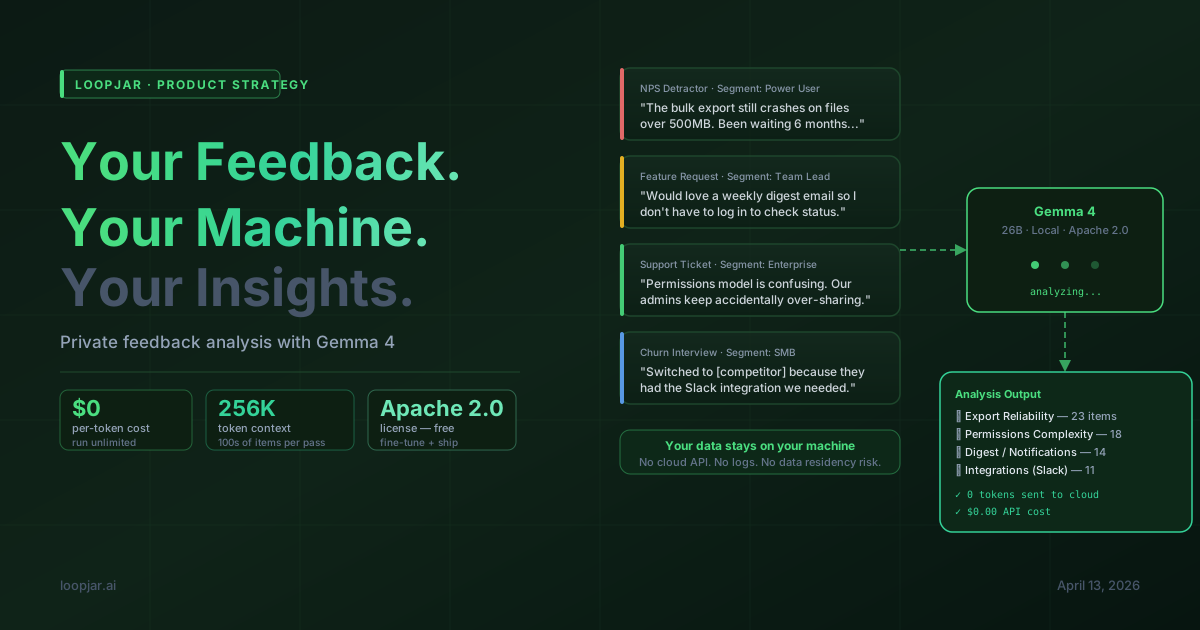
There's a quiet assumption baked into most AI-powered product workflows: that your customer feedback belongs in someone else's data center.
Every time you pipe a batch of support tickets, user interviews, or NPS responses into a cloud AI API for analysis, you are shipping your most sensitive competitive intelligence to a third-party server. The model ingests it. The logs capture it. The terms of service acknowledge it. Most teams just don't think about it.
Gemma 4 — Google's open-weight model released April 2, 2026 under Apache 2.0 — changes the calculation entirely. A 31B model that ranks #3 among all open models globally. Runs on a laptop with 18 GB VRAM. Apache 2.0 license meaning you can fine-tune it on your own feedback taxonomy and deploy it commercially. Zero per-token cost.
This isn't about being paranoid about cloud providers. It's about recognizing that your customer feedback is your product strategy — and the team that owns it, processes it, and learns from it fastest wins. Running that process locally gives you control, speed, and economics that cloud APIs simply can't match at scale.
The Problem With Cloud APIs for Feedback Analysis
Cloud AI APIs are excellent tools. But when applied to customer feedback pipelines specifically, they create three problems that compound over time:
1. Data residency. Enterprise customers increasingly require that their feedback data — which often contains product details, workflow descriptions, and pain points that reveal their internal operations — stays within controlled infrastructure. "We process feedback with OpenAI" is a harder conversation than it was two years ago.
2. Per-token economics at scale. Analyzing 50 feedback items per day is cheap. Analyzing 5,000 per day across a growing user base means your AI feedback budget scales linearly with your growth — precisely when you need the economics to improve, not worsen. A local model running on dedicated hardware eliminates the per-query cost entirely.
3. Latency and rate limits. Batch processing a month's worth of feedback for a board report at 11 PM the night before? Cloud APIs have rate limits. A local model runs as fast as your hardware allows, with no queuing.
What Gemma 4 Can Actually Do With Feedback
Before getting into setup, it's worth being concrete about the capability level. Gemma 4 31B instruction-tuned scores 85.2% on MMLU Pro and 80% on LiveCodeBench — but the more relevant signal for feedback analysis is its performance on long-context, structured extraction tasks. With a 256K token context window, it can ingest and reason across hundreds of feedback items in a single prompt pass.
Here's what it handles reliably in feedback workflows:
- Theme clustering — Group 200 support tickets into themes without predefined categories, and name each theme based on the actual language users used
- Sentiment + urgency scoring — Distinguish between "frustrated but patient" and "about to churn" with more nuance than keyword-based sentiment tools
- Feature request extraction — Pull structured feature requests from free-text submissions, normalized to your existing taxonomy
- Persona tagging — Identify which user segment a piece of feedback likely comes from based on vocabulary, use case context, and sophistication level
- Contradiction detection — Surface feedback that directly contradicts your current roadmap assumptions
- Verbatim selection — Pick the 3-5 best quotes per theme that would resonate most in a stakeholder presentation
The 26B MoE variant (activating only 4B parameters at inference time) handles all of these tasks well and runs on a 16 GB GPU — which is the price point for a single dedicated feedback analysis machine for most teams.
Setting Up Your Local Feedback Pipeline
Step 1: Get the Model Running
For a feedback analysis workflow, Ollama is the fastest path to a working setup:
# Install Ollama
curl -fsSL https://ollama.com/install.sh | sh

# Pull the 26B MoE for the best speed/quality balance (~16 GB)
ollama pull gemma4:26b

# Or the 31B for maximum quality if you have the VRAM
ollama pull gemma4:31b-it
Once running, Ollama exposes an OpenAI-compatible REST API at localhost:11434/v1. Any existing code using the OpenAI Python SDK can be pointed at your local model with a two-line change:
from openai import OpenAI

# Point at local Ollama instead of OpenAI's servers
client = OpenAI(
    base_url="http://localhost:11434/v1",
    api_key="ollama",  # required but not used
)
Step 2: The Feedback Analysis Prompt
Here's a production-ready prompt for extracting structured insights from a batch of feedback items. It works well with Gemma 4's 26B and 31B models:
import json
from openai import OpenAI

client = OpenAI(base_url="http://localhost:11434/v1", api_key="ollama")

def analyze_feedback_batch(feedback_items: list[dict]) -> dict:
    """
    Takes a list of feedback dicts with 'id', 'text', 'source', 'date'.
    Returns structured analysis: themes, urgency scores, feature requests.
    """

    feedback_text = "\n\n".join(
        f"[#{item['id']}] ({item['source']}, {item['date']})\n{item['text']}"
        for item in feedback_items
    )

    prompt = f"""You are a product analyst. Analyze the following customer feedback batch.

FEEDBACK:
{feedback_text}

Return a JSON object with this exact structure:
{{
  "themes": [
    {{
      "name": "theme name (use customer language, not product jargon)",
      "count": number_of_items,
      "feedback_ids": [list of #ids],
      "urgency": "critical|high|medium|low",
      "best_quote": "verbatim text from one item that best represents this theme",
      "summary": "2-sentence summary of what customers are actually asking for"
    }}
  ],
  "feature_requests": [
    {{
      "feature": "specific feature or change requested",
      "frequency": count,
      "feedback_ids": [list],
      "user_segment_hint": "inferred user type based on vocabulary and context"
    }}
  ],
  "churn_signals": [
    {{
      "feedback_id": "#id",
      "signal": "description of why this item suggests churn risk",
      "severity": "immediate|high|medium"
    }}
  ],
  "roadmap_contradictions": [
    "any feedback that challenges common product assumptions"
  ]
}}

Be specific. Use the customer's actual words in summaries. Do not invent themes not present in the data."""

    response = client.chat.completions.create(
        model="gemma4:26b",
        messages=[{"role": "user", "content": prompt}],
        temperature=0.1,  # low temp for structured extraction
        response_format={"type": "json_object"},
    )

    return json.loads(response.choices[0].message.content)
Step 3: Processing at Scale
For large feedback volumes, process in batches of 50-100 items to stay within a comfortable context budget while maintaining coherent theme detection across items:
import asyncio
from typing import AsyncGenerator

async def process_feedback_in_batches(
    all_feedback: list[dict],
    batch_size: int = 75
) -> list[dict]:
    """Process large feedback volumes in parallel batches."""

    batches = [
        all_feedback[i:i + batch_size]
        for i in range(0, len(all_feedback), batch_size)
    ]

    # Process batches concurrently (Ollama handles queueing)
    tasks = [analyze_feedback_batch(batch) for batch in batches]
    results = await asyncio.gather(*[
        asyncio.to_thread(analyze_feedback_batch, batch)
        for batch in batches
    ])

    return results


# Then merge themes across batches with a second pass:
def merge_batch_themes(batch_results: list[dict]) -> dict:
    """Consolidate themes from multiple batches into unified view."""

    all_themes = []
    for result in batch_results:
        all_themes.extend(result.get("themes", []))

    # Second-pass merge: ask the model to consolidate
    merge_prompt = f"""These themes were extracted from separate batches of customer feedback.
Consolidate them into a unified theme list. Merge duplicates, keep the strongest quotes.

THEMES TO MERGE:
{json.dumps(all_themes, indent=2)}

Return the same JSON structure with merged, deduplicated themes."""

    response = client.chat.completions.create(
        model="gemma4:31b-it",  # use 31B for the synthesis pass
        messages=[{"role": "user", "content": merge_prompt}],
        temperature=0.1,
        response_format={"type": "json_object"},
    )

    return json.loads(response.choices[0].message.content)
Weekly Feedback Digest: A Practical Template
One of the highest-leverage uses of this setup is a fully automated weekly feedback digest — the kind of summary that currently takes a PM 2-3 hours to compile on a Friday afternoon. Here's a script that pulls from your feedback tool, runs analysis locally, and formats a Slack-ready summary:
import datetime

def generate_weekly_digest(feedback_since: datetime.date) -> str:
    """Generate a structured weekly digest from local feedback analysis."""

    # 1. Fetch this week's feedback from your source
    # (adapt to your feedback tool's API — Loopjar, Intercom, Zendesk, etc.)
    weekly_feedback = fetch_feedback_since(feedback_since)

    # 2. Run local analysis (zero cloud cost)
    analysis = analyze_feedback_batch(weekly_feedback)

    # 3. Format for Slack/Notion
    lines = [
        f"*📊 Product Feedback Digest — Week of {feedback_since}*",
        f"_{len(weekly_feedback)} items analyzed locally with Gemma 4_\n",
        "*Top Themes This Week:*",
    ]

    for i, theme in enumerate(analysis["themes"][:5], 1):
        urgency_emoji = {"critical": "🚨", "high": "🔴", "medium": "🟡", "low": "🟢"}
        lines.append(
            f"{i}. {urgency_emoji.get(theme['urgency'], '⚪')} *{theme['name']}* "
            f"({theme['count']} items)\n   > _{theme['best_quote']}_"
        )

    if analysis.get("churn_signals"):
        lines.append(f"\n*⚠️ Churn Signals: {len(analysis['churn_signals'])} items flagged*")

    if analysis.get("feature_requests"):
        top_requests = analysis["feature_requests"][:3]
        lines.append("\n*Top Feature Requests:*")
        for req in top_requests:
            lines.append(f"• {req['feature']} ({req['frequency']} mentions)")

    return "\n".join(lines)
Fine-Tuning on Your Own Feedback Taxonomy
The prompting approach above works well out of the box. But the real unlock for product teams is fine-tuning Gemma 4 on your own historical feedback — teaching it your product's specific taxonomy, your user segments, and your categorization conventions.
Apache 2.0 means you can fine-tune freely and deploy commercially. The 31B Dense variant is the recommended base for fine-tuning. The fastest path is Unsloth, which reduces fine-tuning memory requirements by ~40%:
pip install unsloth

# Or use Unsloth Studio's UI-based fine-tuning pipeline
# (no code required — upload examples, configure, train)
For a feedback taxonomy fine-tune, you need roughly 200-500 labeled examples in the format: {"input": "feedback text", "output": "correct structured JSON"}. Pull these from your historical feedback that's already been manually categorized. After fine-tuning, Gemma 4 will apply your exact taxonomy automatically — no prompt engineering required.
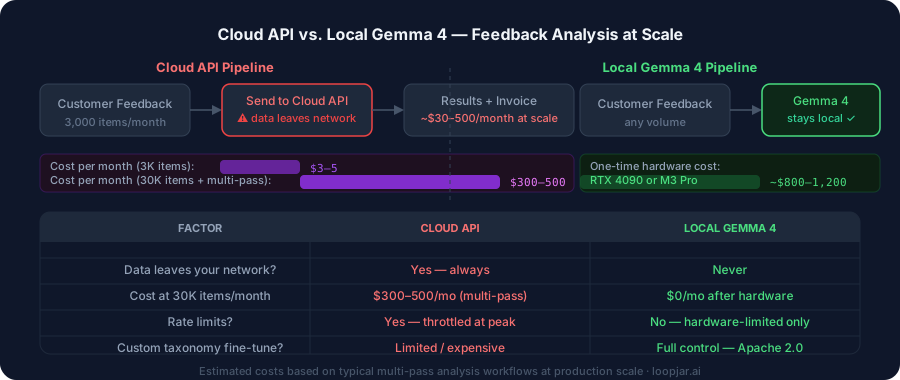
The Economics: Cloud API vs. Local at Scale
Let's run the numbers for a mid-size SaaS team processing 3,000 feedback items per month, averaging 150 tokens per item for extraction:
Cloud API (at typical rates):
3,000 items × 300 tokens avg (input + output) = 900K tokens/month
At $3-5/1M tokens = ~$3-5/month. Cheap at this scale.
But scale to 30,000 items/month as you grow (larger team, more channels, historical re-analysis) = $30-50/month. Fine. But include the multi-pass prompting needed for good results (3-4 passes per batch), add the cost of the synthesis and formatting passes, and run retrospective analysis on 6 months of history — you're at $300-500/month in API costs before you've done anything unusual.
Local Gemma 4 on a dedicated machine:
A used RTX 4090 (24 GB VRAM, handles 31B at 4-bit) costs ~$800-1,200. Zero per-token cost thereafter. Pays for itself in 2-4 months against a $300-500/month API habit — and then runs free indefinitely, with no rate limits and no data leaving your network.
For teams on Apple Silicon: M3 Pro with 36 GB unified memory runs the 26B MoE at production speed. No GPU purchase needed if you're already on Apple hardware.
What This Means for How You Build Feedback Loops
When feedback analysis has a marginal cost of zero, the calculus on how often you run it changes. Right now, most teams analyze feedback weekly or monthly because manual analysis is expensive in time and cloud analysis is expensive in dollars.
With a local Gemma 4 pipeline, you can run analysis on every new feedback item as it arrives. You can re-analyze your entire historical corpus every time you update your taxonomy. You can run speculative analysis — "what if we reframed our roadmap around this alternative theme cluster?" — without worrying about API costs.
The feedback loop gets tighter. The lag between customers telling you something and you acting on it compresses. And the data stays yours — on your hardware, in your control, never touching a third-party API.
That's the real value of Gemma 4 for product teams. Not the benchmark numbers. The fact that it puts frontier-class feedback intelligence inside your infrastructure, with economics that improve as you scale rather than worsen.
The code examples in this post work with Ollama + Gemma 4 running locally. All model variants are available on Hugging Face under Apache 2.0. For the E4B and 26B variants, a standard developer laptop is sufficient hardware.